

Most AI tools can check content for spelling, grammar, and basic style out of the box—no customization required. But Artificial Intelligence software can miss the mark. To build an automated, effective QA check, you’ll need to define its purpose and set controlled inputs, explicit evaluation rules, a feedback structure, and a human review gate. Read on to get started creating an AI content review tool that streamlines content development while preserving human-led workflows and oversight.
What Is an AI Content Review Tool?
An AI content review tool is a program or application that uses artificial intelligence to evaluate, audit, and optimize text based on defined standards and a predefined workflow. If you think it sounds cool, it is—when it’s built to work alongside a team.
When you give a CustomGPT, Gems, or other AI system the right guardrails, references, and instructions, it can more consistently audit drafts for errors, compare content against generative engine optimization standards or other best practices, and flag areas that need a second look.
Building Blocks of a Custom AI-Powered Content Review Tool
Before we walk through the steps in more detail, review the elements of creating an AI-powered QA tool below.
| Elements | What it is | What’s included / examples |
| Defined purpose | A description of what the tool should accomplish | Content types, users, and solutions |
| Reference materials | Documentation to guide reviews and set content standards | Brand voice, style guides, SEO/GEO guidelines, compliance and regulatory documents, accessibility standards |
| Evaluation criteria | The standards, responsibilities, and ownership | What it checks, how it handles issues, and tool behavior |
| Core instructions | Clear, repeatable AI instructions that will be uploaded into the tool | What must it always check? Only check if requested? What should it avoid? |
| User inputs | Materials a user must provide for each review | Content doc, keywords, intent, page type, reference URL |
| Output standards | Formatting guidance for communicating findings | Overall assessment, feedback categories, rating scale, explanations |
| Testing and refining | Running representative content samples through the tool | Identify problems, false positives, inconsistencies, and refine rules |
| Rollout | Supply the tool to the team and establish ongoing ownership | User training, feedback collection, updates, periodic quality checks |
First: Define the Tool’s Purpose
What do you want the tool to do? Think beyond baked-in review capabilities like spell-check, grammar, and computer-generated composition tips (no thanks) because these don’t require a custom system. Consider who will use it, and decide what it will ultimately solve.
The beauty of a customized tool is that it can catch things typical editing software won’t know to look for, such as:
- Style requirements (branding, age-appropriateness, and audience considerations)
- Prohibited and preferred wording and industry-specific terminology
- Content elements, such as header hierarchy, structure, and HTML
- Passages where interpretation (and human review) matter, such as legal and medical content
Set Up Ingestion Rules and User Inputs
Without prompt-level instructions and knowledge files, an AI-based writing checker may make incorrect or unhelpful assumptions. The tool decides on-brand capitalization, spelling, or preferred terminology, and which standards are acceptable. Yes, it can—and will—review anything you feed it. Whether it’s correct depends on the guardrails and ingestion rules you set up.
An AI content review tool needs to understand these elements before it can make a useful evaluation:
- What its job is—review long-form content, check metadata, review press releases
- What the user will provide—pasted text, PDFs, markup
- What standards it should check against—knowledge files, style guide, brand guide, industry terminology, search engine optimization best practices
- What it should ignore and evaluate—ignore boilerplate template, evaluate content within framework, etc.
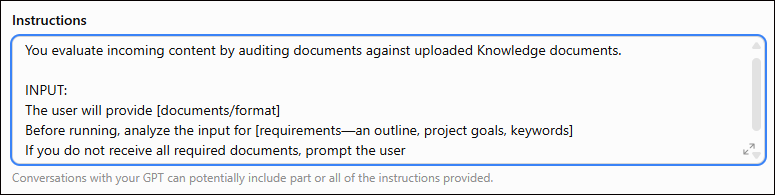
Establishing clarity early helps ensure the tool receives correctly formatted documents and all the necessary info upfront.
Content to Be Reviewed
A meta description has different rules than a 1,000-word blog or 4,000-word whitepaper. Defining what content types the AI system reviews helps users know what materials it is designed for and gives the AI tool a basis for what it’s expected to process (though it will process pretty much anything you give it).
Make what the tool should receive from the user and the format—pasted text, PDF, Google Docs—as clear as what it should ignore, such as HTML or layout boilerplate.
These parameters reduce the chances that someone on your team will feed a metadata checker tool an intro paragraph or that an AI tool will try to reduce a Product Description Page to 154 characters.
Review Qualities
Don’t set up a tool and ask it to make this sound [adjective]. It doesn’t matter what you plug in there—professional, smart, edgy—the results will be overly broad and inconsistent.
You must define the qualities you want the tool to evaluate and give it guardrails with brand voice specifics, language preferences, required terminology, industry terms, prohibited phrases, and business objectives. Then you can add whatever qualifying [adjective] you want, if necessary.
Source Material and Reference Documents
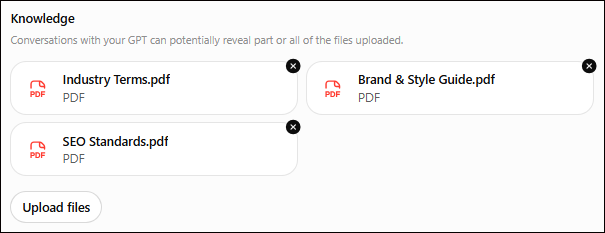
Compile data on the customer, audience, industry, and the brand, and prepare knowledge files to configure the tool. These documents give the AI a consistent reference on what the content should sound like or accomplish rather than letting it assume.
These files and instructions establish the review standard and give you space to be as specific as you need; these also help you get around any annoying character limits within the tool by referencing source documents or knowledge files instead of writing out each standard.
The image below shows resources that I’d typically upload to a tool. Each document can be very long and very specific, saving precious characters in the instructions for tool actions and behaviors.
Define Evaluation Rules
The tool needs rules for what to look for and how to respond when it identifies an issue. Defining these scenarios helps clarify which checks can be automated, which require AI-assisted evaluation, and which should be left to human judgment.
Define What It Checks
Categorize the evaluations into buckets, such as brand style, legal risk, or factual support, so you can ask for a full review or choose which elements to focus on. The materials you upload will provide the standards it checks against, but you still need to tell it what to do.
Assign Owners & Decide Tool Behavior
Decide which people will own review tasks and where the content checker fits within the workflow. Here’s what I recommend:
- AI tools can own objective reviews. If you give it requirements with yes/no or pattern-matched answers, the LLM will typically excel at identifying issues (sometimes unrelentingly—re: Rule Monster below).
- Use AI to find and flag subjective issues. Let it flag product pages lacking context or a blog that buries the lede, for example, but leave final decisions to a human editor, writer, or SEO expert.
- Let humans own YMYL and high-risk decisions. A human should review any language that can significantly affect someone’s health, finances, safety, or well-being (YMYL, Your Money or Your Life) or that carries brand risk. The tool can be configured to flag these, but the final call on legal or ethical risks shouldn’t be left to an AI tool.
Create a decision checklist to lay out what the tool owns, what team members own, and which decisions may be assisted by AI and signed off on by a human, such as:
| Type of check | Example | Best owner | Recommended tool behavior |
| Spelling, formatting, required fields | Missing metadata, incorrect heading order, prohibited character | Deterministic automation | Flag automatically; offer direct fix when safe |
| Required terminology | Wrong product name, outdated client term, banned phrase | Deterministic automation | Flag exact occurrence and approved replacement |
| Content completeness | Required topic, section, example, or CTA is absent | Automation + AI review | Identify the missing requirement and where it applies |
| Brand/style alignment | Copy feels overly promotional or conflicts with defined tone rules | AI-assisted review | Flag passage, cite the relevant rule, explain concern |
| Search-intent alignment | Article delays or fails to answer the main reader question | AI-assisted review | Flag the structural issue and explain what answer is missing |
| Repetition/usefulness | Multiple passages make substantially the same point | AI-assisted review | Identify overlapping passages; recommend consolidation rather than blindly rewriting |
| Factual support | Claim appears unsupported by approved sources | AI + human verification | Flag for verification; do not present the model’s judgment as proof |
| Strategic quality | Angle, argument, insight, originality, usefulness to the audience | Human | Keep as editorial judgment; AI may surface questions but should not make the final decision |
| Sensitive/legal/client risk | Regulated claims, consequential advice, contractual or client-sensitive language | Qualified human | Escalate rather than auto-approve or automatically rewrite |
| Publication approval | Is this ready to go live? | Human | Require explicit human sign-off |
Design Feedback That Helps Writers Adjust the Content
While a content quality checker can give you an absolute pass/fail rating, it should also produce actionable findings and structured feedback that a writer can use to improve the content. A ‘passing grade’ may look good in theory, but it can unintentionally approve passages with legal risk or medical advice, which require deeper consideration.
Structured feedback allows the tool to pass some aspects and flag others, and provides a scannable list of fixes that a writer can prioritize. We’ve done something like this example below for our team’s tools:
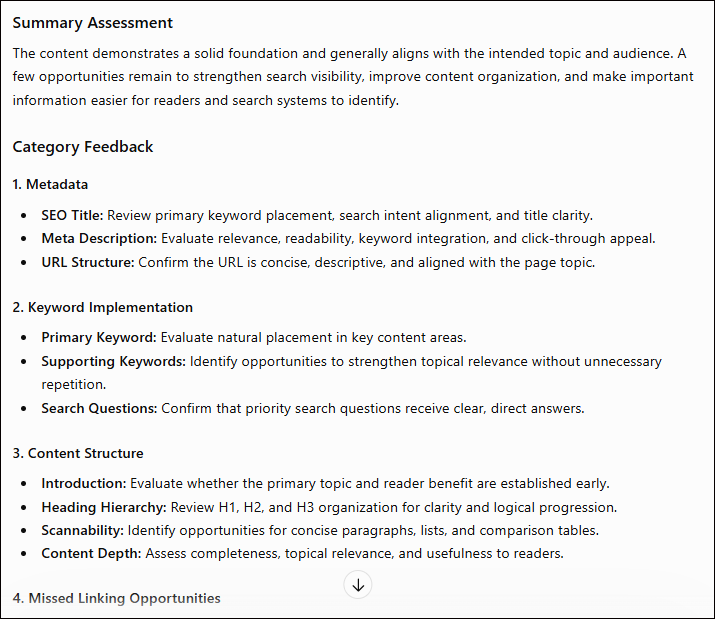
You can specify what you want each feedback set to include, such as:
- Which passage(s) are impacted
- What rule the content triggered
- The severity of the issue (non-negotiable fixes versus low priority)
- A concise explanation
- Suggested next action, such as evaluate, identify, or confirm
Consider what information will help streamline the human review gate.
Implement a Human Review Gate
A passing grade from an AI writing checker means the tool didn’t recognize any machine-detectable errors. It doesn’t mean the draft is ready for publishing. The same is true of drafts that the AI says need work. AI will suggest changes because that’s its job. All suggestions should be reviewed closely by an editor, writer, and subject-matter expert, not automatically approved or edited.
The human review gate is critical in automated publishing workflows, especially for companies using AI to help generate the content in the first place.
Google holds publishers responsible for content no matter who wrote it, and unfactual, low-value, or spammy AI-created content can violate Google’s policies.
Test, Test, Test Before Sharing It With the Team
I hope this doesn’t surprise you, but AI tools can make mistakes. Don’t unleash a new tool to a team and assume it won’t hallucinate, produce false positives, or misinterpret standards.
Before using the tool across a team, test it by giving it incomplete inputs and various content qualities to see if you can break it, where it fails, what patterns emerge, and how it performs.
Dig into your archives for different content types to use for testing, including:
- Strong content that should pass
- Weak content that should fail
- Content with audience intent issues and subjective SEO
- Obvious rule violations or prohibited phrases
- Subtle violations and nuanced language issues
- Content from different industries or content types
- Factual statements or YMYL topics that should trigger review
- Other samples likely to produce false approvals
Test Content and Track Failures
A false positive is compliant content incorrectly flagged. A false negative is a genuine issue the checker misses. You’ll want to test for both very intentionally to see what it ignores or catches.
If you implement a tool in your workflow with consistent false positives, writers might just ignore the tool, and if you’re given consistent false negatives, it creates false confidence and risks publishing subpar or non-compliant content.
Once you’re able to document that the tool works consistently across repeated tests, you can begin rolling it out to the team to experiment with or use (cautiously).
Review Output and Feedback Structure
While you’ve given the tool an output structure, you’ll still want input from writers, editors, and subject matter experts who will actually be using it.
As others on the team test the tool, ask them to also review the feedback structure and identify:
- Confusing warnings
- Missing rules
- Unnecessarily strict rules
- Conflicting recommendations
- Places where the tool oversteps human judgment
- Specific edge cases the tool stumbles on
Make Updates and Test Again
You may need to update the QA tool’s instructions several times to fine-tune it and improve its consistency. Instead of making incremental changes every test, create a list (or even better, ask the tool to catalog a list of instructions or failures as you go) and add the ones that matter to the tool.
Periodically review recurring flags, writer feedback, and overridden recommendations. If team members consistently dismiss a warning, the rule may be too broad or lack appropriate exceptions. Adjust the tool based on the consensus, not one-offs.
Don’t Create a Rule Monster
Too many incremental instructions and corrections can turn the AI into a Rule Monster—overly restrictive, conflicted, and flagging things like crazy. This can snarl a review process.
Instead of adding every correction as a rule, decide what should be baked in and what belongs in the chat interface. If you’re unsure, ask yourself this:
Should this instruction apply automatically the next time someone uses the tool?
- If your answer is yes, build it into the tool.
- If your answer is no, users should put it in the chat on a case-by-case basis.
- If it depends, provide the rule in the back end and use the chat to specify when or how it applies.
With this filter, you can make updates intentionally when SEO or GEO best practices change, content strategy shifts, or style directions need tweaking.
What a Good AI Content Quality Checker Looks Like in Practice
A useful content checker removes repetitive QA work, letting teams focus on strategy, creativity, and the bigger picture. This is an ideal workflow for teams who want an AI assist but not an overhaul:
- A user uploads a draft into the AI workflow with its brief.
- AI checks whether the user has provided what it needs to run.
- It begins making deterministic checks to identify yes/no errors and objective violations.
- AI evaluates selected qualitative criteria.
- The tool returns the findings in the agreed-upon feedback format, with severity and context.
- The user catalogs errors or oversteps for the troubleshooting list.
- The user reviews and resolves straightforward issues in the document.
- The content flows to the editor, SEO manager, or subject matter expert for review(s).
- The appropriate human party reviews flagged passages and edits or tasks the content.
- The final approver—human!—receives the updated and signed-off draft.
Even in workflows like ours, where an SEO sets up the project and a copywriter drafts solid content, we still run it through a checker, and then review the feedback heavily. Tools can get things wrong even with testing and adjustments. A human—an SEO manager, subject matter expert, editor, or writer—must own the work, the standards, and the approval.
Remember, you aren’t creating a substitute. You’re developing a system that removes repetitive QA work so humans can spend more time on what matters. At Eight Oh Two, we use AI to free up tasks so we can stay focused on strategy and creativity. If you’re ready to see how our team can streamline your content workflow so it’s ready for what’s next in AI search, fill out the form below to start a discussion.