

Google Ads phishing emails are becoming harder to spot because many no longer look obviously suspicious. They can closely resemble routine Google Ads notices, including account invitations, security updates, and requests to re-authenticate a Google Ads manager account, commonly known as an MCC. Eight Oh Two has received multiple examples firsthand, and some of our client contacts have received similar messages.
Remember: never use a link or button in an unexpected email to access Google Ads. Instead, navigate directly to ads.google.com or contact your PPC account manager to verify the request.
Is This Google Ads Email Legit?
If you received an unexpected Google Ads email, do not assume it is legitimate because it uses Google branding, names a real account, or looks professionally designed. Check the full sender address, avoid using links or buttons in the message, and verify the request by going directly to Google Ads at ads.google.com or contacting your PPC account manager.
Google Ads Phishing and MCC Takeover Attempts Are Increasing
These attempts are not isolated. Search Engine Land reported a rise in Google Ads MCC takeover attempts in November 2025, including near-perfect copies of account-access invitations that sent users to fake login pages. In April 2026, the publication followed with a first-person account of an MCC compromise and recovery.
The tactics have continued to evolve. In July 2026, the Cofense Phishing Defense Center documented a Google Ads “account sync” maintenance lure that used urgency, Google branding, a redirect, and a lookalike domain to harvest credentials—closely resembling the first example below. Google has also warned that modern phishing can mirror legitimate login flows and capture session data, meaning multi-factor authentication alone does not make an unexpected email link safe.
Example 1: Fake Google Ads MCC Sync Email
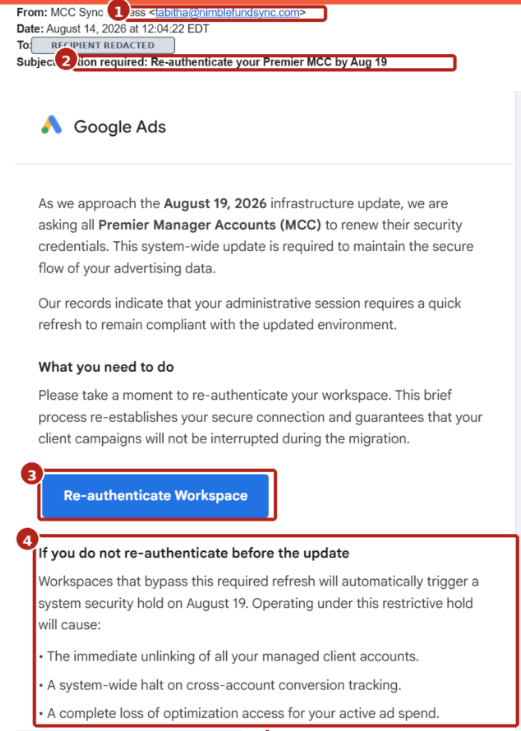
Figure 1. A fake “MCC Sync” message. 1) non-Google sender; 2) urgent re-authentication subject; 3) unsafe email button; 4) threats designed to create panic. Recipient information is redacted.
This message uses a sender on an unrelated domain, a made-up infrastructure deadline, and dramatic consequences if the recipient does not act. The different typography is another clue, but visual inconsistencies are not a reliable test, as attackers can copy official designs.
Example 2: Fake Google Ads Account Invitation
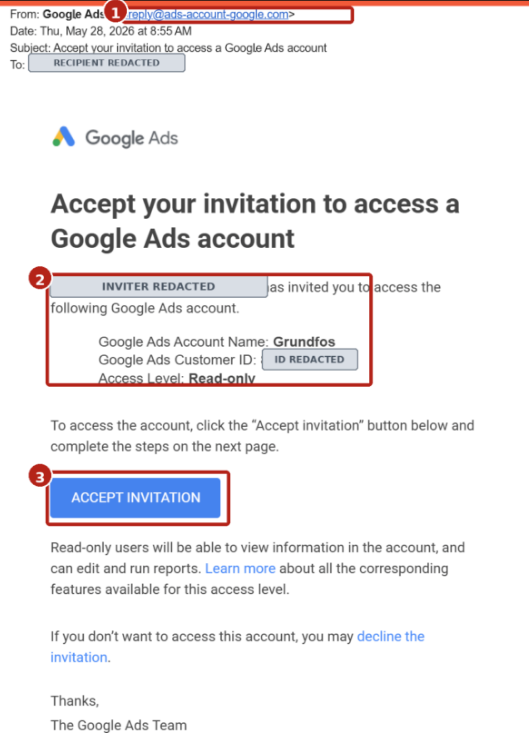
Figure 2. A more convincing fake invitation. 1) ads-account-google[.]com is not google.com; 2) believable account details are not proof; 3) never accept an unexpected invitation from the email. Recipient and customer ID are redacted.
This version is harder to spot. The formatting closely matches a genuine Google Ads invitation, and the account name appears plausible. The decisive clue is the sender domain: ads-account-google[.]com is a separate domain, not a Google subdomain. Remember, a familiar account name, customer ID, or company-branded invitation can be copied from public information or a compromised source.
How to verify a Google Ads email safely
- Inspect the complete sender address. Ignore the display name. Google says the From address and Return-Path for messages it sends should contain @google.com or @ads.google.com. Read the domain carefully; extra words and hyphens matter.
- Do not click, reply, download, or accept. If the message is unexpected, stop—even when it looks polished or names a real account.
- Verify through a separate channel. Open a new browser tab and type ads.google.com yourself, or ask your Eight Oh Two PPC/account manager to verify the request. Do not use contact information supplied in the suspicious email.
- Treat urgency as a tactic. Claims about imminent suspension, unlinking, security holds, lost tracking, or mandatory re-authentication are meant to short-circuit normal review.
- Remember that real-looking details can be weaponized. Logos, fonts, account names, customer IDs, signatures, and even legitimate company names do not authenticate a message.
What to Do If You Clicked a Google Ads Phishing Link
Act immediately. Contact your account manager and your internal IT/security team. Stop interacting with the page; change your Google password from a clean browser session; review active sessions, Google Ads users, linked manager accounts, billing, and change history; and report the incident through official Google support.
How to Reduce Your Risk
- Require 2-Step Verification or stronger authentication across manager-owned accounts.
- Restrict allowed email domains and keep administrative access to the minimum necessary.
- Remove dormant users, former employees, old client accounts, and unused manager links.
- Keep at least one trusted client-side administrator on each account and use multi-party approval where appropriate.
- Make “verify with your paid search manager” the default response to unexpected invitations.
Google explains these manager-account controls in its Manager Account Security Mandates guidance.
A convincing email is not necessarily an authentic email. The safest habit is simple: do not enter Google credentials, approve access, or re-authenticate from an unexpected message. Navigate directly to Google Ads or ask your Eight Oh Two team to verify it first.
References and Further Reading
Google Ads Help: Suspicious emails or calls claiming to be from Google Ads
Cofense (July 21, 2026): Click to Sync: From Google Ads Maintenance Notice to Credential Theft
Search Engine Land (Nov. 25, 2025): Google Ads MCC takeover attacks are rising
Search Engine Land (Apr. 14, 2026): Google Ads MCC hacked? Here’s what to do immediately